CryptoLocker Virüslerinden Kurtulmanın Yolları
Geliştirici: Resmi Geliştirici • 2,839 Görüntülenme
İndirme Seçenekleri ve İşletim Sistemleri
CryptoLocker Virüslerinden Kurtulmanın Yolları Son Sürüm
Windows için doğrudan indirme
Program İncelemesi ve Kullanım Kılavuzu
Aşağıda iki çözüm mevcut. Size bulaşan virüs farklı bir varyanta sahip olabilir. İkisini de denemenizde yarar var.
CryptoLocker virüsü gibi virüsler fidye virüsü olarak adlandırılır.
Geçtiğimiz yaz aylarında FireEye ve FOX IT adlı iki güvenlik şirketi CryptoLocker virüsünün şifrelediği dosyaları ve virüsü analiz ederek, tersine mühendislik yolu ile bir online şifre çözme uygulaması devreye aldılar. Eğer şansınız varsa CryptoLocker virüsünün form değiştirmemiş bir versiyonu ile karşı karşıyasınızdır.
Aşağıda hem CryptoLocker virüsü temizleme hem de şifreli dosyaların nasıl açılacağına dair bir çözüm yolu paylaşacağım. Denemenizde yarar var.
CryptoLocker virüsü nasıl temizlenir?
CryptoLocker virüsü temizleme işlemi iki adımdan oluşacak. Önce virüsün enfekte olduğu sistem temizlenecek daha sonra da şifreli dosyaların şifrelerinin nasıl çözüleceğini anlatacağım. Şuan için CryptoLocker virüsü temizleme için en etkin ve tek geçerli yol olarak bu anlatacağım yöntem söz konusu.
CryptoLocker virüsü şuanda pek çok güncel antivirüs tarafından tespit edilebiliyor ve temizlenebiliyor.
- Öncelikle bilgisayarınızı virüs taramasından geçirin.Norton Power Eraser nedir? Nasıl Kullanılır? ile bilgisayarınızı önce taratın. Bu işlemden sonraDr.Web CureIt! nedir? Dr.Web CureIt! nasıl kullanılır? ile bilgisayarınızı tarafın. Daha sonra bilgiayarın tamamen virüslerden arındığından emin olmak için Malwarebytes nedir? Malwarebytes nasıl kullanılır? ile bilgisayarınızı taratın. Burada 3 farklı antivirüs ile taratırmandaki sebep virüsün form değiştirmiş olma ihtimali. Eğer Norton Power Eraser virüsü bulursa ve temizlerse daha sonra sadece Dr Web veya Malwarebytes ile bilgisayarınızı taratmanız yeterlidir.
- Daha sonra virüsün etkilediği dosyalardaki şifrelemeyi kaldırmak için aşağıdaki işlemleri deneyin
- Buradaya tıklayarak FireEye ve Fox IT web sitesi olan decryptcryptolocker web sitesini açın.
- Formu doldurun. Email adresinizi yazın. Şifreyi çözmek için gerekli Key dosyası email adresinize gönderilecektir.
Choose File butonuna tıklayarak .encrypted uzantılı şifreli dosyasınız seçin.
reCAPTCHA ekranında ekranda resimde gördüğünüz karakterleri Metni Yazın yazan kutuya doğru şekilde yazın.
Decrypt it! butonuna tıklayın.
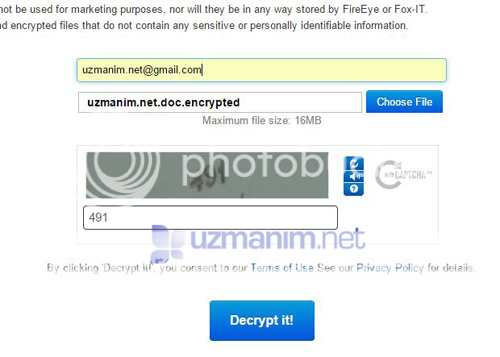
- CryptoLocker File Upload Succes mesajını göreceksiniz.
- Mail adresinizi kontrol edin mail adresinize Results of DeCryptoLocker Service yazılı bir mesaj gelmiş olmalı.
- Mailin içinde size ait Private Key bilgisi olacaktır. Private Key aşağıdaki metne benzeyen karakter topluluğudur:
-----BEGIN RSA PRIVATE KEY-----
MIICWwIBAAKBgFEFU71H6IvEb1nFqcog3KCnPDWDGNYFkJ+gKOwQ5VOTCOkKjhwv
W25t6fJaWaEQEDDO0dmk58XFWU5MzYLyGWulgqRalzqe4kM1kZ1MzeL8stMyqfUP
AwxAtSbwmFEj3swZdulrqK7Mk9izzOqFta7ixOi+HGK+w/pyTF9C/yaJAgMBAAEC
gYA2ssb/Ec4AlkSqsdTYPmlVGLKAWhppW2ZxLfqSrTF1w92PH24jvyEWI6R+1tqN
7z9PBEIOktNa5MpPH3Dbh8D69kuWgp7JQBhfyxnK8nRm0DMDO5Wc3RlVhLNTreRP
KKMwPELRVQEB9ZoLAZxEASkxlOrPAyWHbR4vJoeVrBB+VQJBAJKcIyWYm6y2SwRS
z7Z4FPPna7RAHkWepEPIgl/+hhYVO6V6rX9dSFHBLg7T+Fx2E/soTsx0+T677v8X
wQtf0MMCQQCNeQ78LjYQgn5TXJyxxSvofJpMAcsPaa3vLwFyF2f7KQuElzgiXkHJ
llUzBad2PEAvmq5JpM4bx7/hlf6hfjbDAkAQM/dicVJLLT5vNOPF69GM/zeVDT0L
PrQy1ZcrGssg56nW6Q8Bs4KJnosDkoOxXE9rA5Jp4EenmkeYo7xvEGDXAkEAid2h
Zsu50Bj69k3YPb1B7swOqWdN9XUtFVufcwmwQShcmxeqkoN8ZPDlklU+PpC0lC+P
DSFX4eak7Td47vPKdQJASaalvGHNgwm6HsnxUgz6jT2dmiPBXwY+TfIU1EzbOpJp
PMiN7YMTmPaAWS6Ldm4Reb4XOc/lMPeWolQflCRisQ==
-----END RSA PRIVATE KEY-----
- Bu, CryptoLocker virüsü'nün şifrelediği dosyayı çözmek için gerekli anahtar metindir.
- Buradan CryptoLocker temizleme programını indirin.
- İndrmiş olduğunuz dosya Decryptolocker.exe dosyası virüsün şifrelediği dosyaları açacak uygulamadır.
- Decryptolocker.exe dosyasını şifreli dosyanın olduğu klasöre kopyalayın.
- Örneğin şifreli dosyalarımız Masaüstünde Özel klasöründa olsun. Decryptolocker.exe dosyasını özel klasörünün içine kopyalayın.
- Decryptolocker.exe komut satırı uygulamasıdır. Yani bir takım komutlar kullanarak şifre çözme gerçekleşecek.
- Komut istemini (CMD.exe) yönetici olarak çalıştırın. Bilmiyorsanız buradan nasıl yapıldığını öğrenebilirsiniz Windows 7'de CMD yönetici olarak nasıl çalıştırılır? Windows 8'de CMD yönetici olarak nasıl çalıştırılır?
- Komut isteminden şifreli dosyanın olduğu klasöre girin. Örnekteki gibi özel klasörüne ulaşmak için şu komutu kullanın. Bu komut siste değişecektir. Örneğin kullanıcı adınız uzmanim.net yerine siz ne ise onu yazın.
cd c:\Users\uzmanim.Net\Desktop\Ozel
- Daha önce bu klasöre kopyaladığınız Decryptolocker.exe dosyasını çalıştıracaksınız. Şu komutu uygulayın
Decryptolocker.exe –key “Email ile gelen Key” Şifrelidosya.doc
- Key bölümünü size gelen maildeki aşağıdaki ifadeleride içeren karakter topluluğudur. Örnekteki gibi çift tırnak içinde mailin içindeki KEY'i komuta yapıştırın. Yukarıda örneğini vermiştim.
- Kolaylık sağlaması için komutu notepad ile hazırladıktan sonra kopyala-yapıştır yapabilirsiniz.
- Komutu uyguladığınızda aşağıdaki gibi bir ekran gelecek bu ekrana YES yazın ve enter tuşuna basın.
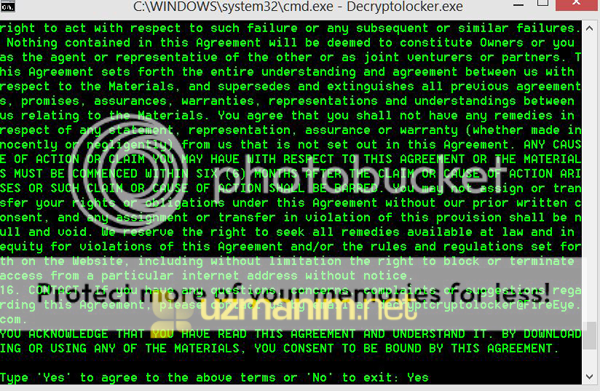
- Daha sonra ekrana Successfully decrypted file: uzmanim.net.doc gibi bir mesaj gelirse dosyanız kurtuldu demektir.
Decryptolocker.exe –key “Key” C:\Klasör Adı\*Eğer bir sürücüdeki tüm CryptoLocker virüsünün etkilediği şifreli dosyaları şifreden kurtarmak istiyorsanız
Decryptolocker.exe –key “Key” -r C:\komutunu kullanın. Şuan CryptoLocker virüsüne karşı en etkili temizleme ve şifre kaldırma yöntemi yukarıda bahsettiğimm yöntemdir. Bunun dışında yapılacak işlemler dosyalarınıza zarar verebilir. Bu sebepten dosyalarınızı manuel düzenlemeye, değiştirmeye çalışmayın. CryptoLocker virüsü tarafından şifrelenen dosyaları el ile kurcalamak dosyaların kalısı olarak bozulmasına sebep olur. Daha sonra bir şekilde Key üretilse bile bozuk dosya da çalışmayacaktır. CryptoLocker virüsü temizleme ve şifreli dosyaları kurtarma yöntemini olabildiğinde detaylı anlatmaya çalıştım. Aklınıza takılan bir nokta olursa buraya yazabilirsiniz. [Referans:fireeye.com] Çözüm 2: CryptoLocker virüsü Alternatif çözüm yolu: TTNET Fatura virüsü için bu yöntem denenebilir. TTnet Fatura virüsü normalde kullanıcının yetkisi varsa gölge kopyaları siliyor. Fakat kullanıcınızın yetkisi yoksa silme işlemi başarılı olamıyor ve gölge kopya üzerinden dosyaları kurtarmak mümkün oluyor. CryptoLocker virüsünden dosyaları kurtarmanın bir diğer yolu Sistem geri yüklemesi oluşturulmuş sistemlerde eski bir tarih üzerinden dosyanın gölge kopyasını almak. Fakat sizde sistem koruması açık ve bir geri yükleme noktası oluşturulmuş olmalı.
- ShadowExplorer uygulamasını buradan indirin.
- ShadowExplorer uygulamasını kurduktan sonra çalıştırın.
- Virüsün bulaşma tarihinden önce bir geri yükleme noktası seçin.
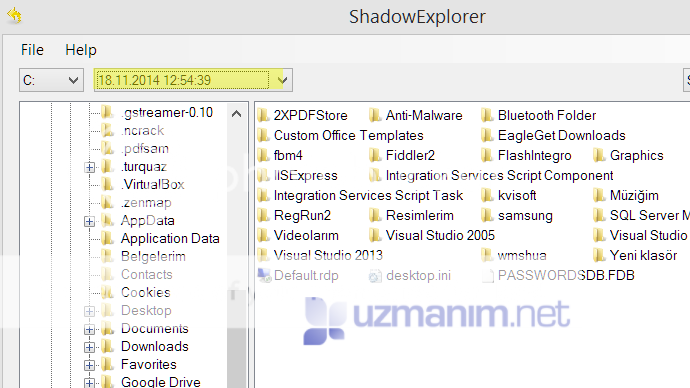
- Kurtarmak istediğiniz dosyayı sağ tuşla tıkayın ve Export'u seçin.
- Nereye kaydetmek istiyorsanız oraya dosyanızı kaydedin.
- The purpose of this guide
- What is CryptoLocker
- Known file paths and registry keys used by CryptoLocker
- What should you do when you discover your computer is infected with CryptoLocker?
- Is it possible to decrypt files encrypted by CryptoLocker? *Updated 8/6/14*
- Will paying the ransom actually decrypt your files?
- How do you become infected with CryptoLocker
- Known Bitcoin Payment addresses for CryptoLocker
- CryptoLocker and Network Shares
- What to do if your anti-virus software deleted the infection files and you want to pay the ransom!
- How to increase the time you have to pay the ransom
- Messages from the ransomware author and information about the CryptoLocker Decryption Service
- How to restore files encrypted by CryptoLocker using Shadow Volume Copies
- How to restore files that have been encrypted on DropBox folders
- How to find files that have been encrypted by CryptoLocker
- How to determine which computer is infected with CryptoLocker on a network
- How to prevent your computer from becoming infected by CryptoLocker
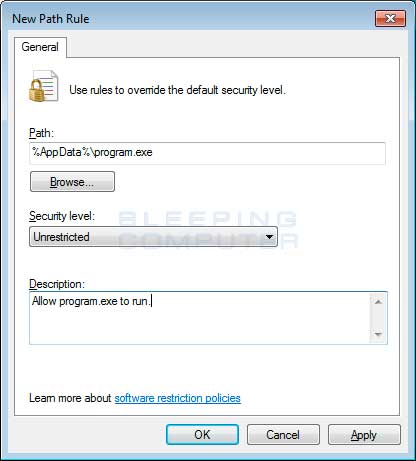
- How to allow specific applications to run when using Software Restriction Policies
- CryptoLocker 2.0: New version or Copycat?
- CryptoLocker Timeline
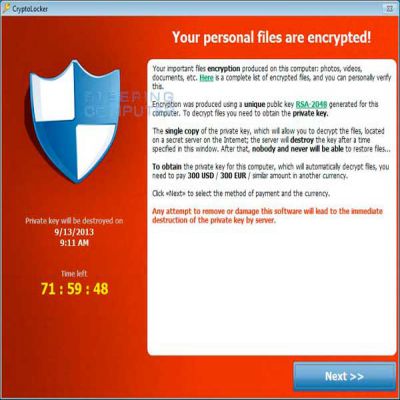
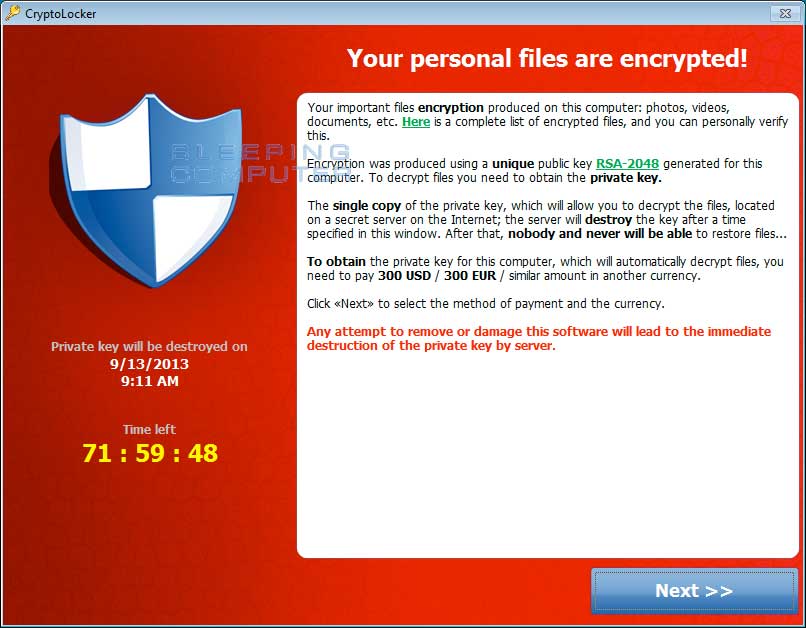 CryptoLocker payment screen
For more screen shots of this infection click on the image above.
There are a total of 3 images you can view.
When you first become infected with CryptoLocker, it will save itself as a random named filename to the root of the %AppData% or %LocalAppData% path. It will then create one of the following autostart entries in the registry to start CryptoLocker when you login:
CryptoLocker payment screen
For more screen shots of this infection click on the image above.
There are a total of 3 images you can view.
When you first become infected with CryptoLocker, it will save itself as a random named filename to the root of the %AppData% or %LocalAppData% path. It will then create one of the following autostart entries in the registry to start CryptoLocker when you login:
KEY_CURRENT_USER\Software\Microsoft\Windows\CurrentVersion\Run "CryptoLocker" HKEY_CURRENT_USER\Software\Microsoft\Windows\CurrentVersion\RunOnce "*CryptoLocker" KEY_CURRENT_USER\Software\Microsoft\Windows\CurrentVersion\Run "CryptoLocker_<version_number>" HKEY_CURRENT_USER\Software\Microsoft\Windows\CurrentVersion\RunOnce "*CryptoLocker_<version_number"The infection will also hijack your .EXE extensions so that when you launch an executable it will attempt to delete the Shadow Volume Copies that are on the affected computer. It does this because you can use shadow volume copies to restore your encrypted files. The command that is run when you click on an executable is:
"C:\Windows\SYsWOW64\cmd.exe" /C "C:\Windows\Sysnative\vssadmin.exe" Delete Shadows /All /QuietThe .EXE hijack in the Registry will look similar to the following. Please note that registry key names will be random.
[HKEY_CLASSES_ROOT\.exe] @="Myjiaabodehhltdr" "Content Type"="application/x-msdownload" [HKEY_CLASSES_ROOT\.exe\PersistentHandler] @="{098f2470-bae0-11cd-b579-08002b30bfeb}" [HKEY_CLASSES_ROOT\Myjiaabodehhltdr] [HKEY_CLASSES_ROOT\Myjiaabodehhltdr\DefaultIcon] @="%1" [HKEY_CLASSES_ROOT\Myjiaabodehhltdr\shell] [HKEY_CLASSES_ROOT\Myjiaabodehhltdr\shell\open] [HKEY_CLASSES_ROOT\Myjiaabodehhltdr\shell\open\command] @="\"C:\\Users\\User\\AppData\\Local\\Rlatviomorjzlefba.exe\" - \"%1\" %*"Once the infection has successfully deleted your shadow volume copies, it will restore your exe extensions back to the Windows defaults. The infection will then attempt to find a live Command & Control server by connecting to domains generated by a Domain Generation Algorithm. Some examples of domain names that the DGA will generate are lcxgidtthdjje.org, kdavymybmdrew.biz, dhlfdoukwrhjc.co.uk, and xodeaxjmnxvpv.ru. Once a live C&C server is discovered it will communicate with it and receive a public encryption key that will be used to encrypt your data files. It will then store this key along with other information in values under the registry key under HKEY_CURRENT_USER\Software\CryptoLocker_0388. Unfortunately, the private key that is used to decrypt the infected files is not saved on the computer but rather the Command & Control server. CryptoLocker will then begin to scan all physical or mapped network drives on your computer for files with the following extensions: *.odt, *.ods, *.odp, *.odm, *.odc, *.odb, *.doc, *.docx, *.docm, *.wps, *.xls, *.xlsx, *.xlsm, *.xlsb, *.xlk, *.ppt, *.pptx, *.pptm, *.mdb, *.accdb, *.pst, *.dwg, *.dxf, *.dxg, *.wpd, *.rtf, *.wb2, *.mdf, *.dbf, *.psd, *.pdd, *.pdf, *.eps, *.ai, *.indd, *.cdr, *.jpg, *.jpe, *.jpg, *.dng, *.3fr, *.arw, *.srf, *.sr2, *.bay, *.crw, *.cr2, *.dcr, *.kdc, *.erf, *.mef, *.mrw, *.nef, *.nrw, *.orf, *.raf, *.raw, *.rwl, *.rw2, *.r3d, *.ptx, *.pef, *.srw, *.x3f, *.der, *.cer, *.crt, *.pem, *.pfx, *.p12, *.p7b, *.p7c. When it finds files that match one of these types, it will encrypt the file using the public encryption key and add the full path to the file and the filename as a value under theHKEY_CURRENT_USER\Software\CryptoLocker_0388\Files Registry key. When it has finished encrypting your data files it will then show the CryptoLocker screen as shown above and demand a ransom of either $100 or $300 dollars in order to decrypt your files. This ransom must be paid using Bitcoin or MoneyPak vouchers. It also states that you must pay this ransom within 96 hours or the private encryption key will be destroyed on the developer's servers. More technical details about this infection can be at this blog post by Emsisoft. Known file paths and registry keys used by CryptoLocker This section lists all known file paths and registry keys used by CryptoLocker. The file paths and registry keys that are currently being used by CryptoLocker will be highlighted in blue. The File paths that are currently and historically being used by CryptoLocker are:
%AppData%\<random.exe> and %AppData%\{<8 chars>-<4 chars>-<4 chars>-<4 chars>-<12 chars>}.exeThe Registry key that is used to automatically start CryptoLocker when you login to Windows are found below.Examples of filenames using this path are: Rlatviomorjzlefba.exe and {34285B07-372F-121D-311F-030FAAD0CEF3}.exe.In Windows XP, %AppData% corresponds to C:\Documents and Settings\<Login Name>\Application Data. In Windows Vista, 7, and 8, %AppData% corresponds to C:\Users\<Login Name>\AppData\Roaming.%LocalAppData%\<random.exe>Examples of filenames using this path are: Rlatviomorjzlefba.exe. In Windows XP, %LocalAppData% corresponds to C:\Documents and Settings\<Login Name>\Local Settings\Application Data\. In Windows Vista, 7, and 8, %LocalAppData% corresponds to C:\Users\<Login Name>\AppData\Local.
KEY_CURRENT_USER\Software\Microsoft\Windows\CurrentVersion\Run "CryptoLocker_<version_number>" HKEY_CURRENT_USER\Software\Microsoft\Windows\CurrentVersion\RunOnce "*CryptoLocker_<version_number"For the above registry values, the current version is 0388. Please note that the * in the RunOnce entry tells Windows to start CryptoLocker even in Windows Safe Mode. CryptoLocker also creates a registry key to store its configuration information and the files that were encrypted. In the past the registry key that was used was HKEY_CURRENT_USER\Software\CryptoLocker. Newer version now include the version of the malware, which is currently 0388, in the key name. The registry key that is currently being used to store the configuration information is HKEY_CURRENT_USER\Software\CryptoLocker_0388. Under this key are 3 registry values that are described below:
| Value Name | Description |
|---|---|
| PublicKey | The PublicKey value contains the public key that was used to encrypt your files. This key will not help you decrypt the encrypted files on your computer. |
| VersionInfo | The VersionInfo value contains information that includes the current version of the malware, the IP address of the Command & Control server, and the timestamp of installation. |
| Wallpaper | The WallPaper value contains information regarding the wallpaper that will be shown as the background on the infected computer's desktop. |
What should you do when you discover your computer is infected with CryptoLocker When you discover that a computer is infected with CryptoLocker, the first thing you should do is disconnect it from your wireless or wired network. This will prevent it from further encrypting any files. Some people have reported that once the network connection is disconnected, it will display the CryptoLocker screen. It is not advised that you remove the infection from the %AppData% folder until you decide if you want to pay the ransom. If you do not need to pay the ransom, simply delete the Registry values and files and the program will not load anymore. You can then restore your data via other methods. It is important to note that the CryptoLocker infection spawns two processes of itself. If you only terminate one process, the other process will automatically launch the second one again. Instead use a program like Process Explorer and right click on the first process and select Kill Tree. This will terminate both at the same time. Is it possible to decrypt files encrypted by CryptoLocker? Updated 8/6/14: FireEye and Fox-IT have released a method of possibly retrieving your private decryption key and a decrypter to use to decrypt your files. These keys were made available through Operation Tovar and were not retrieved by cracking the encryption. To try and retrieve your key, please visit their sitehttp://www.decryptcryptolocker.com/ and enter your email and upload a copy of one of your CryptoLocker encrypted files. The service will then try attempt to decrypt that file using all of the known encryption keys. If they are able to successfully decrypt your file, they will then email you the decryption key with instructions on how to use it. In order to use the decryption you need to paste the entire decryption key they send you, quotes and all, after the --key argument of the Decryptolocker.exe program. An example of how you would decrypt all of the folders and files under a particular folder can be found in this post. As the instructions and how to use the tool are not particularly user-friendly, if you need any help, please see feel free to ask in the CryptoLocker Support Topic. It should also be noted that you can use a different script, that it appears the FireEye/Fox-IT one was based off of, as well. Instructions on using the alternative decrypter can be foundhere. If your key is not available using the above methods, the only methods you have of restoring your files is from a backup or Shadow Volume Copies if you have System Restore enabled. Newer variants of CryptoLocker attempt to delete the Shadow Copies, but it is not always successful. More information about how to restore your files via Shadow Volume Copies can be found in this section below. If you do not have System Restore enabled on your computer or reliable backups, then you will need to pay the ransom in order to get your files back. Will paying the ransom actually decrypt your files? Paying the ransom will start the decryption process of the CryptoLocker infection. When you pay the ransom you will be shown a screen stating that your payment is being verified. Reports from people who have paid this ransom state that this verification process can take 3-4 hours to complete. Once the payment has been verified, the infection will start decrypting your files. Once again, it has been reported that the decryption process can take quite a bit of time. Be warned, that there have been some reports that the decryption process may give an error stating that it can't decrypt a particular file. At this point we have no information as how to resolve this. Visitors have reported that the infection will continue to decrypt the rest of the files even if it has a problem with certain files. How do you become infected with CryptoLocker This infection is typically spread through emails sent to company email addresses that pretend to be customer support related issues from Fedex, UPS, DHS, etc. These emails would contain a zip attachment that when opened would infect the computer. These zip files contain executables that are disguised as PDF files as they have a PDF icon and are typically named something like FORM_101513.exe or FORM_101513.pdf.exe. Since Microsoft does not show extensions by default, they look like normal PDF files and people open them. When CryptoLocker was first released, it was being distributed by itself. Newer malware attachments appear to be Zbot infections that then install the CryptoLocker infection. You will know you are infected with Zbot as there will be a registry key in the form of:
HKCU\Software\Microsoft\<random>Under these keys you will see Value names with data that appears to be garbage data (encrypted info). The droppers will also be found in the %Temp% folder and the main executable will be stored in a random folder under %AppData%. Last but not least, a startup will be created underHKCU\Software\Microsoft\Windows\CurrentVersion\Run to launch it. An example Zbot/CryptoLocker email message is:
-----Original Message----- From: John Doe [mailto:John@mydomain.com] Sent: Tuesday, October 15, 2013 10:34 AM To: Jane Doe Subject: Annual Form - Authorization to Use Privately Owned Vehicle on State Business All employees need to have on file this form STD 261 (attached). The original is retained by supervisor and copy goes to Accounting. Accounting need this form to approve mileage reimbursement. The form can be used for multiple years, however it needs to re-signed annually by employee and supervisor. Please confirm all employees that may travel using their private car on state business (including training) has a current STD 261 on file. Not having a current copy of this form on file in Accounting may delay a travel reimbursement claim.The current list of known CryptoLocker email subjects include:
| USPS - Your package is available for pickup ( Parcel 173145820507 ) | USPS - Missed package delivery ("USPS Express Services" <service-notification@usps.com>) |
| USPS - Missed package delivery | FW: Invoice <random number> |
| ADP payroll: Account Charge Alert | ACH Notification ("ADP Payroll" <*@adp.com>) |
| ADP Reference #09903824430 | Payroll Received by Intuit |
| Important - attached form | FW: Last Month Remit |
| McAfee Always On Protection Reactivation | Scanned Image from a Xerox WorkCentre |
| Scan from a Xerox WorkCentre | scanned from Xerox |
| Annual Form - Authorization to Use Privately Owned Vehicle on State Business | Fwd: IMG01041_6706015_m.zip |
| My resume | New Voicemail Message |
| Voice Message from Unknown (675-685-3476) | Voice Message from Unknown Caller (344-846-4458) |
| Important - New Outlook Settings | Scan Data |
| FW: Payment Advice - Advice Ref:[GB293037313703] / ACH credits / Customer Ref:[pay run 14/11/13] | Payment Advice - Advice Ref:[GB2198767] |
| New contract agreement. | Important Notice - Incoming Money Transfer |
| Notice of underreported income | Notice of unreported income - Last months reports |
| Payment Overdue - Please respond | FW: Check copy |
| Payroll Invoice | USBANK |
| Corporate eFax message from "random phone #" - 8 pages (random phone # & number of pages) | past due invoices |
| FW: Case FH74D23GST58NQS | Symantec Endpoint Protection: Important System Update - requires immediate action |
https://blockchain.info/address/18iEz617DoDp8CNQUyyrjCcC7XCGDf5SVb https://blockchain.info/address/1KP72fBmh3XBRfuJDMn53APaqM6iMRspChNewer variants of CryptoLocker dynamically generate new bitcoin payment addresses for each instance of an infection. You can use the links above to see transactions into the wallet and out of the wallet. CryptoLocker and Network Shares CryptoLocker only encrypts data stored on network shares if the shared folders are mapped as a drive letter on the infected computer. Despite what some articles state, CryptoLocker does not encrypt data on a network through UNC shares. An example of a UNC share is \\computername\openshare. It is strongly suggested that you secure all open shares by only allowing writable access to the necessary user groups or authenticated users. This is an important security principle that should be used at all times regardless of infections like CryptoLocker. What to do if your anti-virus software deleted the infection files and you want to pay the ransom! As many anti-virus programs would delete the CryptoLocker executables after the encryption started, you would be left with encrypted files and no way to decrypt them. Recent versions of CryptoLocker will now set your Windows wallpaper to a message that contains a link to a decryption tool that you can download in case this happens. There are numerous reports that this download will not double-encrypt your files and will allow you to decrypt encrypted files. How to increase the time you have to pay the ransom When the CryptoLocker is first shown, you will see a timer that states you need to pay the ransom within 96 hours. Some people have reported that you can increase the time by rolling back the clock in your BIOS. So to increase the timer by 10 hours, you would change your clock in your BIOS to 10 hours earlier. The virus author has stated that using this method will not help. They have said that the private key required for decryption will be deleted from the Command & Control server after the allotted time regardless of how much time it says is left on the infected computer. Tests by users, though, have shown that the private keys are not deleted and you can pay the ransom even if your time has run out. The steps that people have reported to work are:
- Restore CryptoLocker registry key if it was deleted.
- Immediately shut down computer.
- Start computer and enter bios. Once in the bios, change your clock to some time in the past to increase the timer.
- Reboot your computer.
- CryptoLocker should now show that you have more time left.
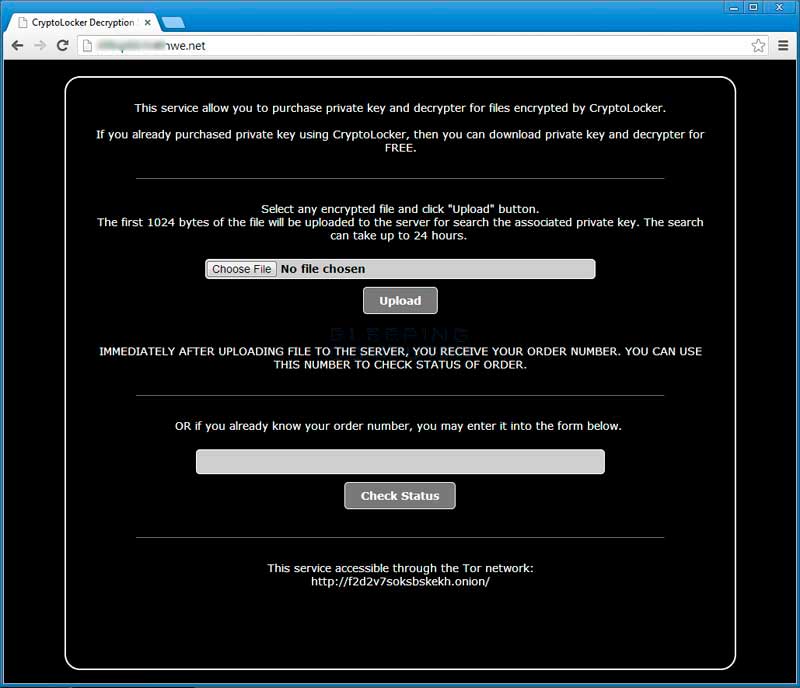 Click on the image above to see full size and other associated images.
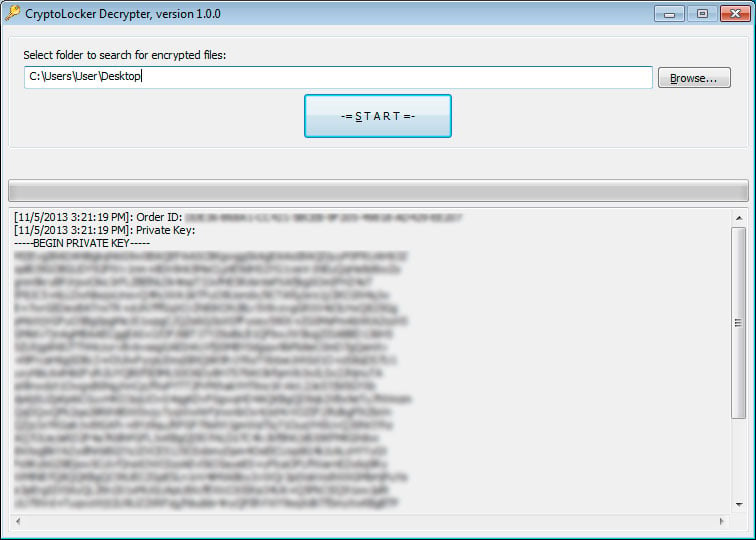 Click on the image above to see full size and other associated images.
More information about this decryption service can be found in this news article: CryptoLocker developers charge 10 bitcoins to use new Decryption Service.
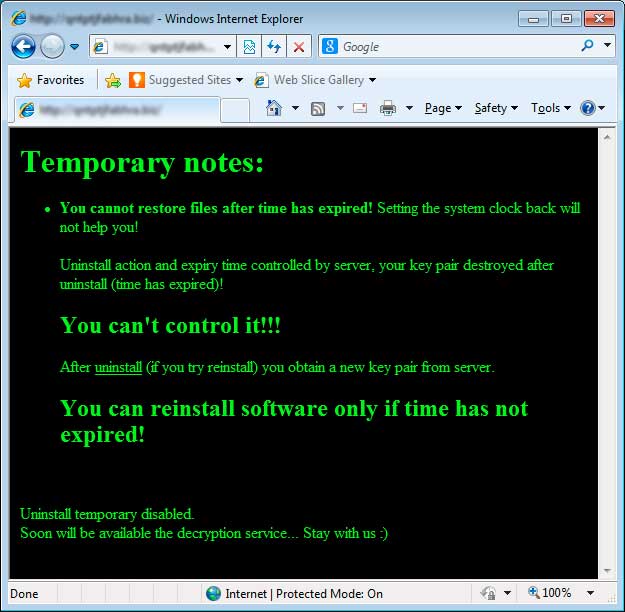
Previous Command & Control home page messages:
Click on the image above to see full size and other associated images.
More information about this decryption service can be found in this news article: CryptoLocker developers charge 10 bitcoins to use new Decryption Service.
Previous Command & Control home page messages:
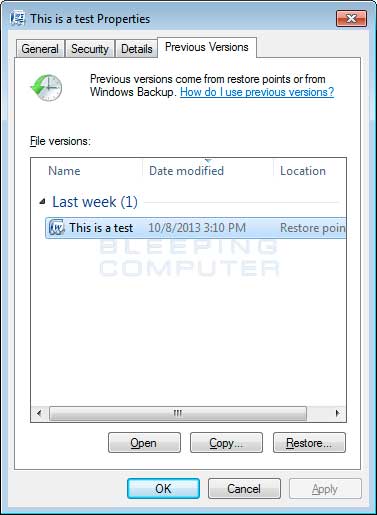
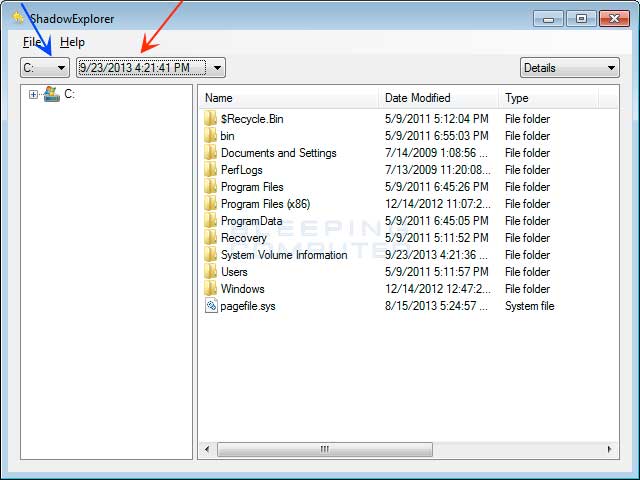
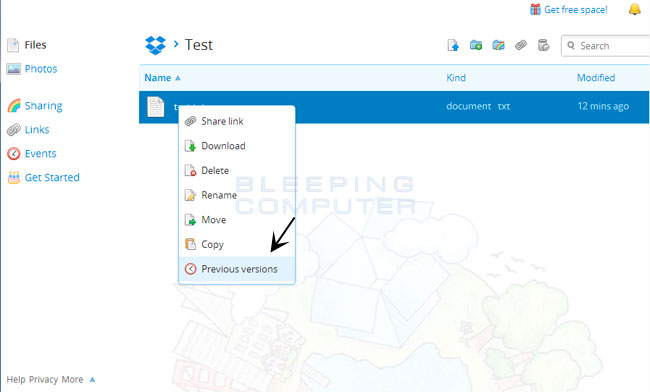
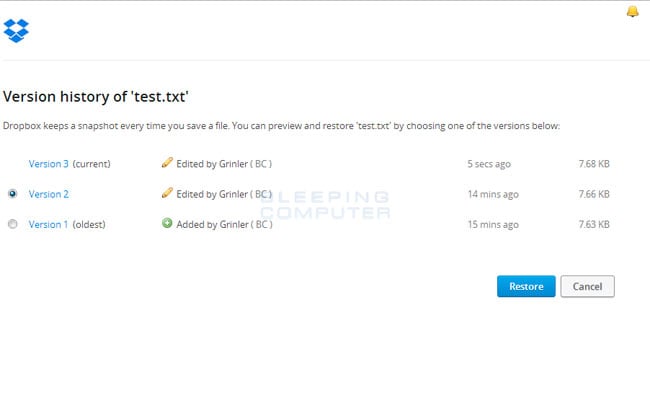
http://download.bleepingcomputer.com/grinler/ListCrilock.exeWhen you run this tool it will generate a log file that contains a list of all encrypted files found under the HKCU\Software\CryptoLocker\Files or the HKCU\Software\CryptoLocker_0388\Files key. Once it has completed it will automatically open this log in Notepad. Method 2: Windows PowerShell Another method is to use the Windows PowerShell (thanks prsgroup): For systems with PowerShell, you can dump the list of files in the CryptoLocker registry key using the following command:
(Get-Item HKCU:\Software\CryptoLocker\Files).GetValueNames().Replace("?","\") | Out-File CryptoLockerFiles.txt -Encoding unicodeMake sure to include the "-Encoding unicode" parameter to ensure that filenames with Unicode characters are preserved. Method 3: Omnispear's CryptoLocker Scan Tool You can use the CryptoLocker Scan Tool from Omnispear to search for and list encrypted files found on your computer. This program will look for certain file identifiers that are normally found in a file based on that file's extension. If the file identifier does not exist it would indicate that the file is either encrypted or corrupted. How to determine which computer is infected with CryptoLocker on a network On a large network, determining the computer that is infected with CryptoLocker can be difficult. Some infected users have reporter that encrypted files will have their ownership changed to the user that the CryptoLocker program is running under. You can then use this login name to determine the infected computer. You can also examine your network switches and look for the ports that have lights that are continuously blinking or show very heavy traffic. You can then use this to further narrow down what computers may be infected. How to prevent your computer from becoming infected by CryptoLocker You can use the Windows Group or Local Policy Editor to create Software Restriction Policies that block executables from running when they are located in specific paths. For more information on how to configure Software Restriction Policies, please see these articles from MS:
http://support.microsoft.com/kb/310791 http://technet.microsoft.com/en-us/library/cc786941(v=ws.10).aspxThe file paths that have been used by this infection and its droppers are:
C:\Users\<User>\AppData\Local\<random>.exe (Vista/7/8) C:\Users\<User>\AppData\Local\<random>.exe (Vista/7/8) C:\Documents and Settings\<User>\Application Data\<random>.exe (XP) C:\Documents and Settings\<User>\Local Application Data\<random>.exe (XP)In order to block the CryptoLocker you want to create Path Rules so that they are not allowed to execute. To create these Software Restriction Policies, you can either use the CryptoPrevent tool or add the policies manually using the Local Security Policy Editor or the Group Policy Editor. Both methods are described below. How to use the CryptoPrevent Tool: FoolishIT LLC was kind enough to create a free utility called CryptoPrevent that automatically adds the suggested Software Restriction Policy Path Rules listed above to your computer. This makes it very easy for anyone using Windows XP SP 2 and above to quickly add the Software Restriction Policies to your computer in order to prevent CryptoLocker and Zbot from being executed in the first place. This tool is also able to set these policies in all versions of Windows, including the Home versions.
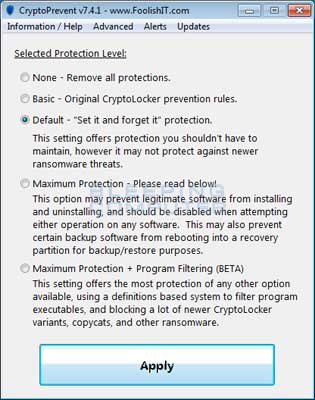
http://www.foolishit.com/download/cryptoprevent/For more information on how to use the tool, please see this page:
http://www.foolishit.com/vb6-projects/cryptoprevent/Once you run the program, simply click on the Apply Protection button to add the default Software Restriction Policies to your computer. If you wish to customize the settings, then please review the checkboxes and change them as necessary. If CryptoPrevent causes issues running legitimate applications, then please see this section on how to enable specific applications. You can also remove the Software Restriction Policies that were added by clicking on the Undobutton. How to manually create Software Restriction Policies to block CryptoLocker: In order to manually create the Software Restriction Policies you need to be using Windows Professional or Windows Server. If you want to set these policies for a particular computer you can use the Local Security Policy Editor. If you wish to set these policies for the entire domain, then you need to use the Group Policy Editor. Unfortunately, if you are a Windows Home user, the Local Policy Editor ir not available and you should use the CryptoPrevent tool instead to set these policies. To open the Local Security Policy editor, click on the Start button and type Local Security Policy and select the search result that appears. You can open the Group Policy Editor by typing Group Policy instead. In this guide we will use the Local Security Policy Editor in our examples. Once you open the Local Security Policy Editor, you will see a screen similar to the one below.
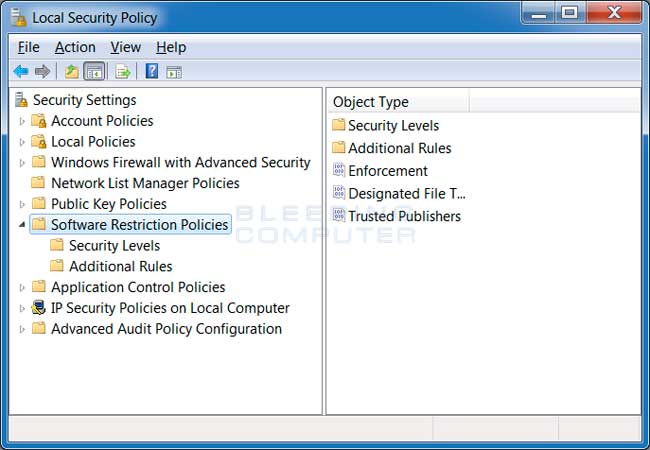
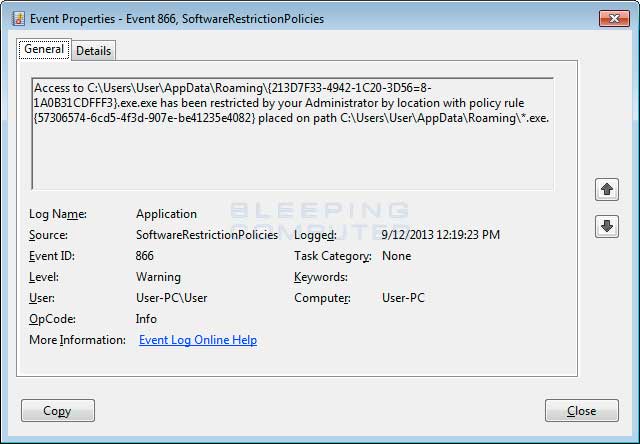
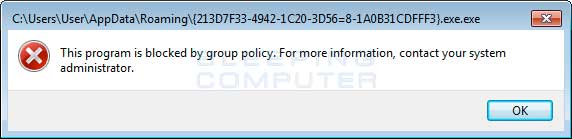
Block CryptoLocker executable in %AppData%You can see an event log entry and alert showing an executable being blocked:Path: %AppData%\*.exe Security Level: Disallowed Description: Don't allow executables to run from %AppData%.Block CryptoLocker executable in %LocalAppData%Path if using Windows XP: %UserProfile%\Local Settings\*.exe Path if using Windows Vista/7/8: %LocalAppData%\*.exe Security Level: Disallowed Description: Don't allow executables to run from %AppData%.Block Zbot executable in %AppData%Path: %AppData%\*\*.exe Security Level: Disallowed Description: Don't allow executables to run from immediate subfolders of %AppData%.Block Zbot executable in %LocalAppData%Path if using Windows XP: %UserProfile%\Local Settings\*\*.exe Path if using Windows Vista/7/8: %LocalAppData%\*\*.exe Security Level: Disallowed Description: Don't allow executables to run from immediate subfolders of %AppData%.Block executables run from archive attachments opened with WinRAR:Path if using Windows XP: %UserProfile%\Local Settings\Temp\Rar*\*.exe Path if using Windows Vista/7/8: %LocalAppData%\Temp\Rar*\*.exe Security Level: Disallowed Description: Block executables run from archive attachments opened with WinRAR.Block executables run from archive attachments opened with 7zip:Path if using Windows XP: %UserProfile%\Local Settings\Temp\7z*\*.exe Path if using Windows Vista/7/8: %LocalAppData%\Temp\7z*\*.exe Security Level: Disallowed Description: Block executables run from archive attachments opened with 7zip.Block executables run from archive attachments opened with WinZip:Path if using Windows XP: %UserProfile%\Local Settings\Temp\wz*\*.exe Path if using Windows Vista/7/8: %LocalAppData%\Temp\wz*\*.exe Security Level: Disallowed Description: Block executables run from archive attachments opened with WinZip.Block executables run from archive attachments opened using Windows built-in Zip support:Path if using Windows XP: %UserProfile%\Local Settings\Temp\*.zip\*.exe Path if using Windows Vista/7/8: %LocalAppData%\Temp\*.zip\*.exe Security Level: Disallowed Description: Block executables run from archive attachments opened using Windows built-in Zip support.
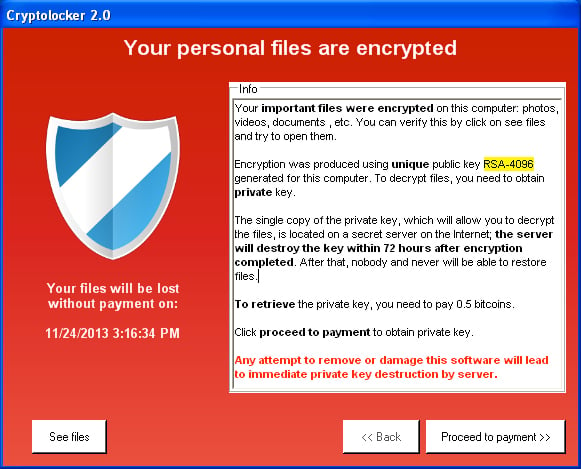
- A major indication that this is a copycat is that it is programmed using a completely different language. The original is programmed in native C++ code that did not have any prerequisites to execute on a computer. CryptoLocker 2.0 is written in C# that requires the .NET Framework 4.0 to run.
- This malware contains a cryptocoin miner called BFGMiner that could allow it to mine Bitcoins, and other crypto coins, using the CPU power or graphic card on your computer. The mined coins would then go into the wallet of the malware developer.
- Based on strings found in the executable, this malware appears to be able perform DDOS attacks.
- The malware does not use a domain generation algorithm, but instead hard codes the C2 server's address.
- Uses a different encryption type then the original CryptoLocker
%AppData%\Microsoft\msunet.exeIt will then create the following registry keys to autostart the program in normal mode and safe mode.
HKCU\Software\Microsoft\Windows\CurrentVersion\Run\MSUpdate %AppData%\Microsoft\msunet.exe HKCU\Software\Microsoft\Windows\CurrentVersion\RunOnce\*MSUpdate %AppData%\Microsoft\msunet.exe HKCU\Software\Microsoft\Windows NT\CurrentVersion\Winlogon\Userinit C:\Windows\system32\userinit.exe,,%AppData%\Microsoft\msunet.exeThe infection encrypts files with the following extensions;
3fr, accdb, txt, ai, arw, bay, cdr, cer, cr2, eps, erf, indd, mp3, mp4, jpe, jpg, kdc, mdb, mdf, mef, mrw, nef, crt, crw, dbf, dcr, der, dng, doc, docm, docx, dwg, dxf, dxg, rwl, srf, srw, wb2, wpd, wps, xlk, nrw, odb, odm, odp, ods, odt, orf, p12, p7b, p7c, pdd, xls, xlsb, xlsm, xlsx, pef, pem, pfx, ppt, pptm, pptx, psd, pst, ptx, r3d, raf, raw, rtfOver all, the developer of this malware drastically changed the approach of the original CryptoLocker. Instead of focusing on encrypting files and getting paid for the decryption key, this infection tries to throw the kitchen sink at you in order to maximize revenue. Bu Yazı uzmanım.net ve bir çok yabancı siteden derlenmiştir.